
• The forum software have been upgraded to the latest version.

    If you notice anything that looks off, or does not work, please let us know.

    For more information, click here.

Posting Links

Carnasaur

asrodrig

New Member
Messages
1,019
Likes Received
69
Trophy Points
0
Hey all! Since I made a tutorial on how to post pictures, I thought I'd make one on how to do links as well.

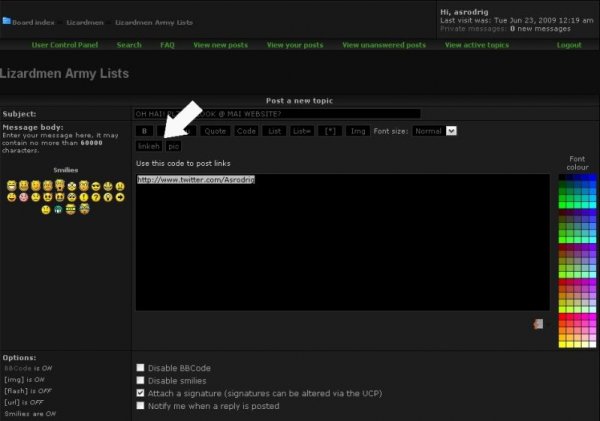
This one's easy. First, type in the URL of the site you wish to be linked:
tut2-1.jpg

Then select it and press this button

tut2-2.jpg

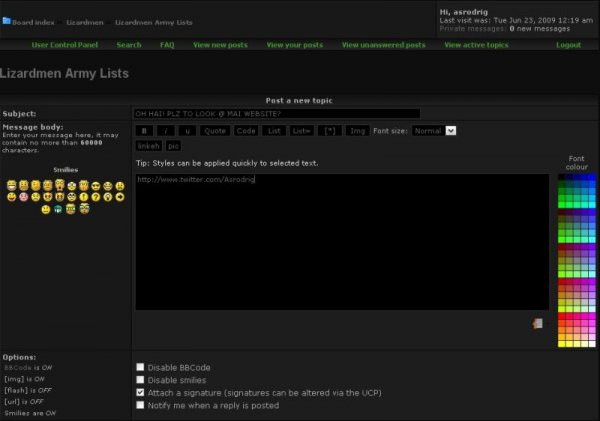
And that's all there is to it!


tut2-3.jpg
 
You can also use the linkeh tag like a normal url tag to make the text something besides the url. Here is an example:


Code:
[URL]www.google.com[/URL]

[URL=www.google.com]Click for google[/URL]

Combine with an image tag:
[URL=www.google.com][attach]1380[/attach][/URL]

Shows up as:

http://www.google.com

Click for google

Combine with an image tag: (You can click the pic for link)
google.jpg


We've been asked a few times about the tags, so I thought I'd move these threads up to here from General Discussion and expand a little.
 
Back
Top