• The forum software have been upgraded to the latest version.

    If you notice anything that looks off, or does not work, please let us know.

    For more information, click here.

Water Bases

Carnasaur

DeathBringer125

Well-Known Member
Messages
1,224
Likes Received
3,203
Trophy Points
113
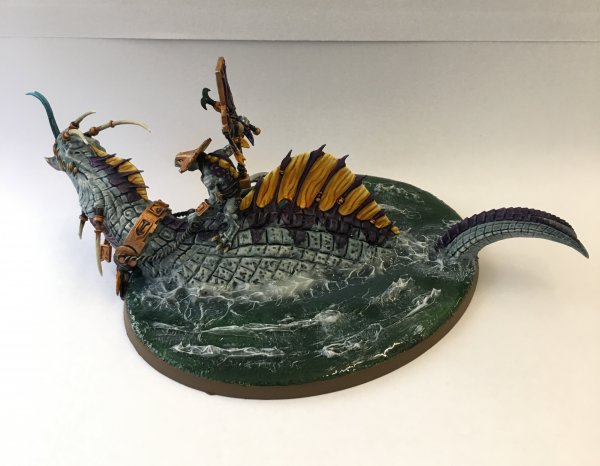
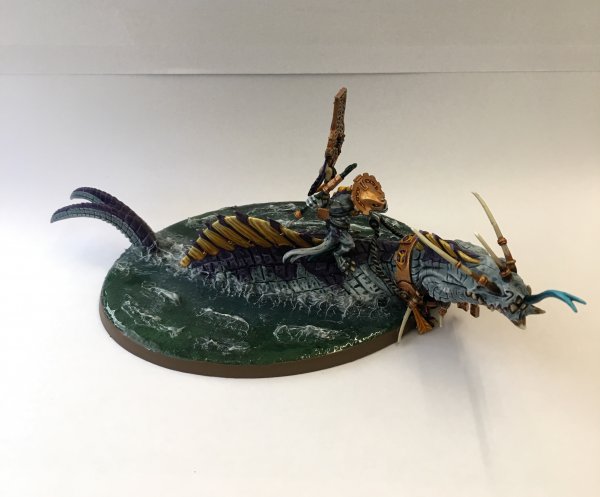
Hey I recently ordered some stuff for Kharadron Overlords (see my forum My Second Army). When I get into painting the ships and flying units bases I thought it would be neat to have a really cool water effect (I saw a troglodon conversion using this). Can anyone tell me how to do this and what paints I need?
 
Hey I recently ordered some stuff for Kharadron Overlords (see my forum My Second Army). When I get into painting the ships and flying units bases I thought it would be neat to have a really cool water effect (I saw a troglodon conversion using this). Can anyone tell me how to do this and what paints I need?

Was it mine?

It's pretty easy to do if you practice before hand.

I used Woodland scenice - Realistic water and water effects.

1. Paint the base dark blue and green or whatever colour you want to show through the water.

2. apply a thin layer of Realistic water, let it dry for a day or two so it's fully cured.

3. To make the wave crests, apply water effects in thin lines where you want the waves to be.

4. Use a Toothpick to flick the lines into crests, let it dry for a few days.

5. Drybrush the crests white.
 
Was it mine?

It's pretty easy to do if you practice before hand.

I used Woodland scenice - Realistic water and water effects.

1. Paint the base dark blue and green or whatever colour you want to show through the water.

2. apply a thin layer of Realistic water, let it dry for a day or two so it's fully cured.

3. To make the wave crests, apply water effects in thin lines where you want the waves to be.

4. Use a Toothpick to flick the lines into crests, let it dry for a few days.

5. Drybrush the crests white.

I will be using this at some point in the future!
 
Was it mine?

It's pretty easy to do if you practice before hand.

I used Woodland scenice - Realistic water and water effects.

1. Paint the base dark blue and green or whatever colour you want to show through the water.

2. apply a thin layer of Realistic water, let it dry for a day or two so it's fully cured.

3. To make the wave crests, apply water effects in thin lines where you want the waves to be.

4. Use a Toothpick to flick the lines into crests, let it dry for a few days.

5. Drybrush the crests white.

I can do a Tutorial if a visual example is better for you guys.
A tutorial would be great! And I think it was yours it was just the body sticking out of the water. It looked amazing!
 
Troglodon part 2

Once fully dry take your finishing putty/clay (im using greenstuff) and apply enough to cover one side, apply to the thickness of the scales, pic below.

View attachment 37530

Now smooth it a little with a wet shaper or your finger, don’t lick your finger dip it in a water pot.

Now take a shaper or tool you can use to make lines, I looked at the carnosaur for reference and just make squares and rectangles then I used the rubber clay shaper to apply texture, just gentle stab the greenstuff,pic below.

View attachment 37535

View attachment 37536


View attachment 37531

View attachment 37532

I put the skink oracle on his back as I have loads of priests but you can leave it off if you don’t have a priest model.

And there you have it a relatively simple way of making the most of your Seraphon starter box.

Couple of pics with the oracle attached.

View attachment 37533

View attachment 37534

I hope you find this useful and keep an eye out for a follow up tutorial on painting your Starter set.

And here he is finished,

44846-3f7f0b53be3be9acbc8dd7e4a120e98d.jpg


44847-9c624d6310649c5fc61612cd03259926.jpg
Found it.
 
Back
Top