Temple Guard
neveroddoreven
Well-Known Member
- Messages
- 210
- Likes Received
- 1,074
- Trophy Points
- 93
Whenever I show my Lizardmen to anyone, whether it's friends, people in Games Workshop, or here on this forum, I always get great comments on my freehand scale textures. So I thought I'd share my methods and discoveries to adding a little bit of scaly goodness to your models.
These work best on smooth surfaces such as Skinks, or Saurus crests. You'll need a detail or liner brush you're comfortable with, the kind you would use to paint eyes for example.
Method 1
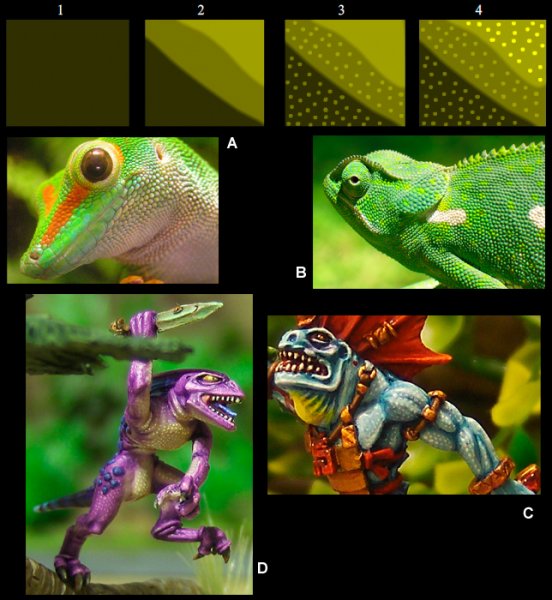
This technique is for fine scales such as geckoes and chameleons as shown in figs. A and B.
This was the first method I came up with and the most straightforward. Essentially, the model is layered as normal (step 2.), but with a final highlight applied as dots.
The number of layers doesn't really matter, but for the purpose of example let's think of it as 3 stages; shade, mid-tone and highlight. Step 3. illustrates how the dots in the shaded area are the mid-tone colour, and the dots in the mid-tone are that of the highlight.
For step 4. a final brighter highlight is applied.
Fig. C shows this method in the classic Lizardmen blue, and D is one of my first goes at it.
Method 2
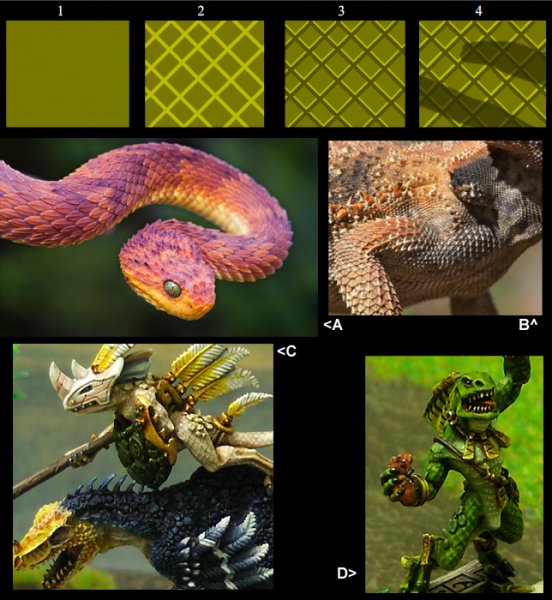
This one emulates the diamond-shape scales found on vipers and rattlesnakes (A), or desert lizards such as bearded dragons (B). It's an extension of the old trusty freehand crack or scratch effect. There are many tutorials out there that demonstrate it, but it just involves placing two lines together of contrasting tones.
For this method I didn't layer up the model as normal, but just applied a flat mid-tone basecoat for step 1.
I then applied a grid pattern in the highlight colour for step 2. I made mine in a diamond formation, but it would probably work well as a square one, like a crocodile's scales or the Bastiladon's.
Step 3. is the hardest part. Another grid is applied with the shade colour. the lines have to be a little thinner than the last step, applied just below them. Take care not to cover them entirely.
Lastly for step. 4 a wash is used in the recesses to add definition.
Fig. C shows how it can work with the previous method. The model's chest scales are finer.
Method 3
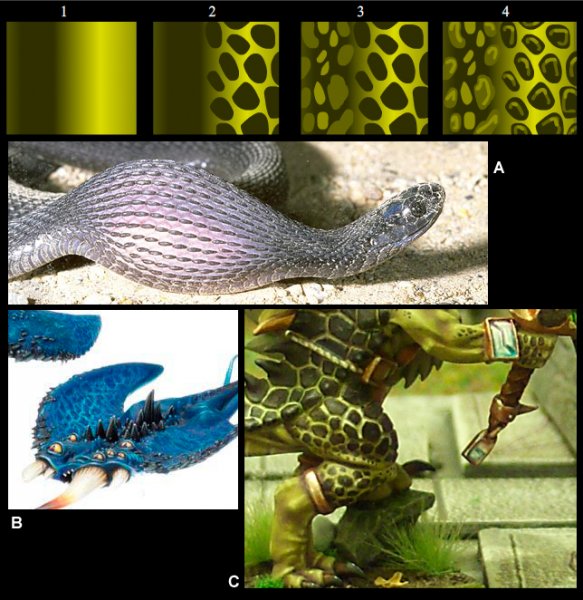
I haven't had much experience doing this one. The idea for it is focusing on the shiny quality of the skin in-between the scales as demonstrated on the stretched skin of this egg-eating snake (fig. A). It was inspired by this 'Eavy Metal painted Screamer of Tzeench (B).
For step 1, layer and shade the model as normal. The technique works best with a bright highlight.
For step 2. paint dark scales in the highlight area.
For step 3. paint mid-tone scales in the shaded area. For extra effect the recessed scales can be painted as bright as the highlight colour.
For step 4. the scales can all be highlighted to make them appear 3D.
Fig. C is my only example of the method. I extended the existing 3D scales with freehand ones.
I hope this guide inspires some of you to try these out. Please post pics if you do!
These work best on smooth surfaces such as Skinks, or Saurus crests. You'll need a detail or liner brush you're comfortable with, the kind you would use to paint eyes for example.
Method 1
This technique is for fine scales such as geckoes and chameleons as shown in figs. A and B.
This was the first method I came up with and the most straightforward. Essentially, the model is layered as normal (step 2.), but with a final highlight applied as dots.
The number of layers doesn't really matter, but for the purpose of example let's think of it as 3 stages; shade, mid-tone and highlight. Step 3. illustrates how the dots in the shaded area are the mid-tone colour, and the dots in the mid-tone are that of the highlight.
For step 4. a final brighter highlight is applied.
Fig. C shows this method in the classic Lizardmen blue, and D is one of my first goes at it.
Method 2
This one emulates the diamond-shape scales found on vipers and rattlesnakes (A), or desert lizards such as bearded dragons (B). It's an extension of the old trusty freehand crack or scratch effect. There are many tutorials out there that demonstrate it, but it just involves placing two lines together of contrasting tones.
For this method I didn't layer up the model as normal, but just applied a flat mid-tone basecoat for step 1.
I then applied a grid pattern in the highlight colour for step 2. I made mine in a diamond formation, but it would probably work well as a square one, like a crocodile's scales or the Bastiladon's.
Step 3. is the hardest part. Another grid is applied with the shade colour. the lines have to be a little thinner than the last step, applied just below them. Take care not to cover them entirely.
Lastly for step. 4 a wash is used in the recesses to add definition.
Fig. C shows how it can work with the previous method. The model's chest scales are finer.
Method 3
I haven't had much experience doing this one. The idea for it is focusing on the shiny quality of the skin in-between the scales as demonstrated on the stretched skin of this egg-eating snake (fig. A). It was inspired by this 'Eavy Metal painted Screamer of Tzeench (B).
For step 1, layer and shade the model as normal. The technique works best with a bright highlight.
For step 2. paint dark scales in the highlight area.
For step 3. paint mid-tone scales in the shaded area. For extra effect the recessed scales can be painted as bright as the highlight colour.
For step 4. the scales can all be highlighted to make them appear 3D.
Fig. C is my only example of the method. I extended the existing 3D scales with freehand ones.
I hope this guide inspires some of you to try these out. Please post pics if you do!